

Move, merge or void items
Move dishes between tables or seats, merge orders, hand a table to another server, and void or comp a dish with a reason.
Table actions
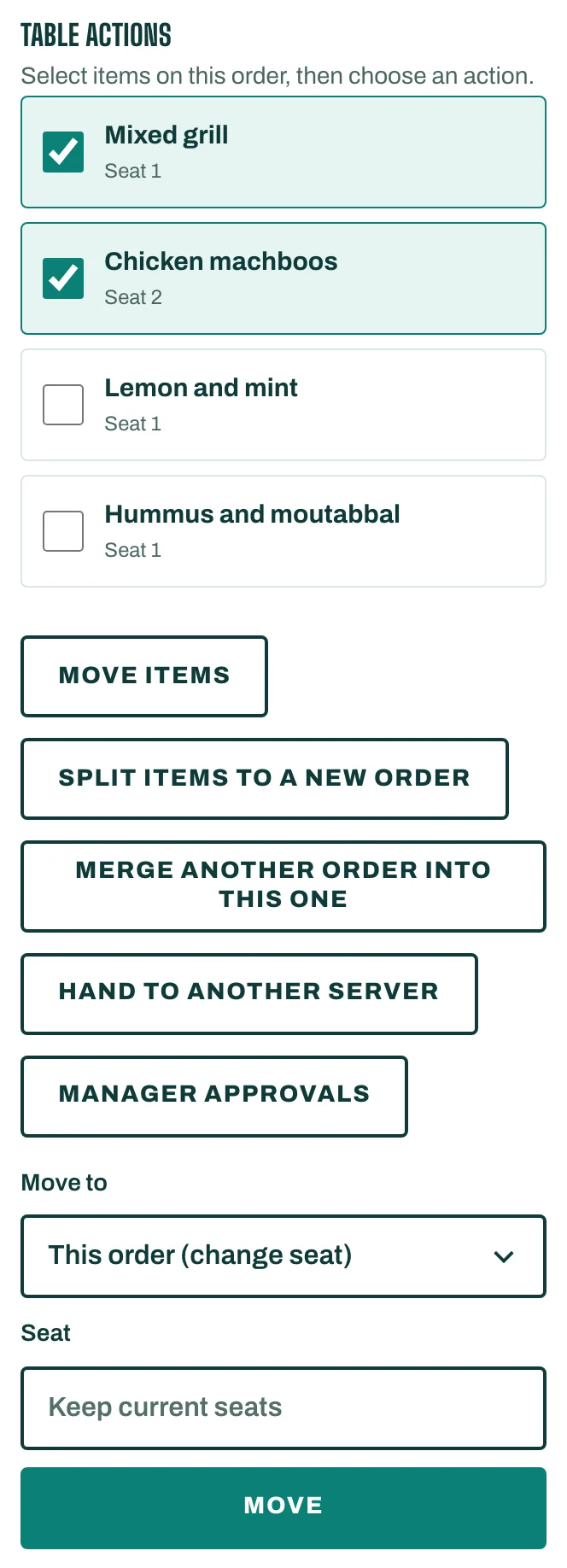
Open the order. Under Table actions, select dishes on the order, then choose an action:
- Move items: choose Move to another order, or This order (change seat), then tap Move.
- Merge another order into this one: pick the Order to merge and tap Merge. Its dishes, guests and table join this order. It must not have a bill yet.
- Split items to a new order: the selected dishes move to a new order on a free table or another order type. Tap Create order.
- Hand to another server: choose the Server and tap Hand over.
To move the whole order to another table, or change it from dine-in to takeaway, tap Move or change type.
Void, comp or change a price
These need a Reason:
- Void item (on a sent dish, Void fired item) takes it off the order.
- Comp (free of charge) keeps the dish on the order at no charge.
- Open price or price override sets another price.
- Waive service charge removes the service charge from this order.
If Your role approves this immediately. shows, it is done at once. Otherwise tap Send: the request shows Waiting for a manager until a manager taps Approve or Reject under Manager approvals (More, then Approvals).
Cancel an order
Tap Cancel order and give a Reason. A sent order can be cancelled only after every sent dish has been voided with a reason.
Good to know
- A dish already billed can't be moved, merged or voided. It is corrected by a refund on its receipt (Refund items).