

Match your bank statement
Import your bank statement and match each line to your books, by hand or with the matching agent.
Matching your bank (reconciling) proves that your books agree with the bank.
Link the account and import a statement
- In Accounting, open Bank reconciliation.
- The first time, tap Link bank account: choose its Cash ledger account and type the Last four digits.
- Tap Import statement and choose the CSV or OFX file downloaded from your bank's website.
- Check the Preview, then tap Confirm import.
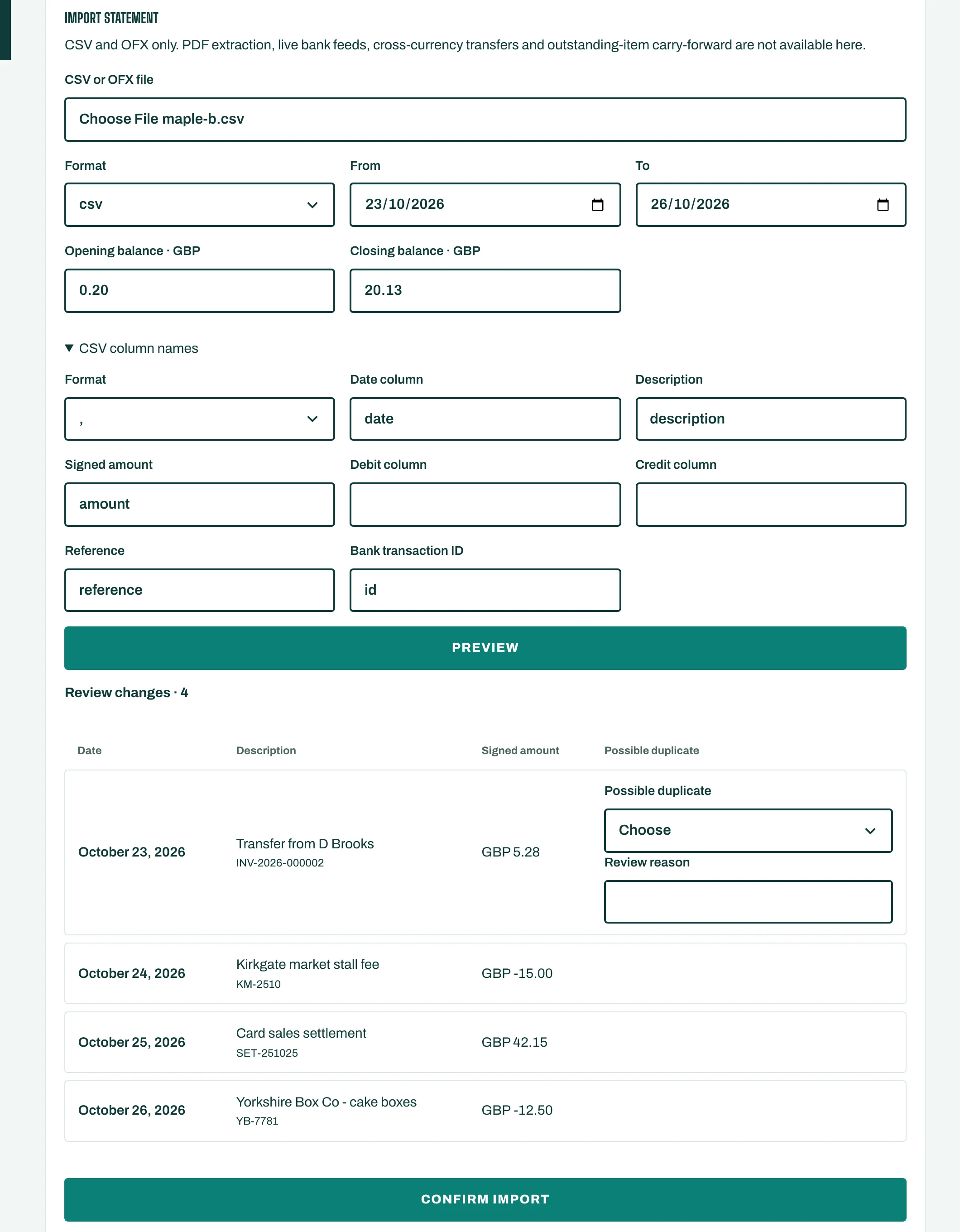
If a line looks like one already imported, STAK shows Possible duplicate. Choose Use existing row or Create distinct row.
Match the lines
For each bank line, choose what it is:
- Match: it pays an invoice or bill already in the books,
- Create transaction: for example a bank charge, with its Income or expense account,
- Transfer: money moved between two of your accounts.
Then Save for review, and Approve and apply (a second person, or the owner with I explicitly approve this as the owner).
Let the matching agent help
Tap More, then Bank matching. The agent reads your bank lines and suggests matches, with its reasons.
- Open the account and choose its Mode: Suggest only, or Apply what is sure up to a limit you set. Tap Save the rules.
- Tap Run the agent now.
- Go through Lines marked With a suggestion. Each shows Sure, Likely or Possible and Why. Tap Accept or Not this.
Every automatic match can be undone with Undo.