

Prepare your VAT return
See your return figures for the period in your tax authority's own layout, then record it once filed.
STAK works out your VAT from your issued invoices, till sales and approved supplier bills. You file the return on your tax authority's portal; STAK gives you the figures to copy.
Set up once
- Go to Settings, then Tax and VAT, and tap Open tax settings. (In Accounting, tapping VAT due opens the same page.)
- Under Registration, check that Registered for VAT is on, with your VAT number.
- Set the Return period the tax authority gave you, and the date your registration started.
- Tap Save tax settings.
Prepare the return
- Open VAT returns. Each period shows In progress, Ready to file, Overdue or Filed, with its Due date.
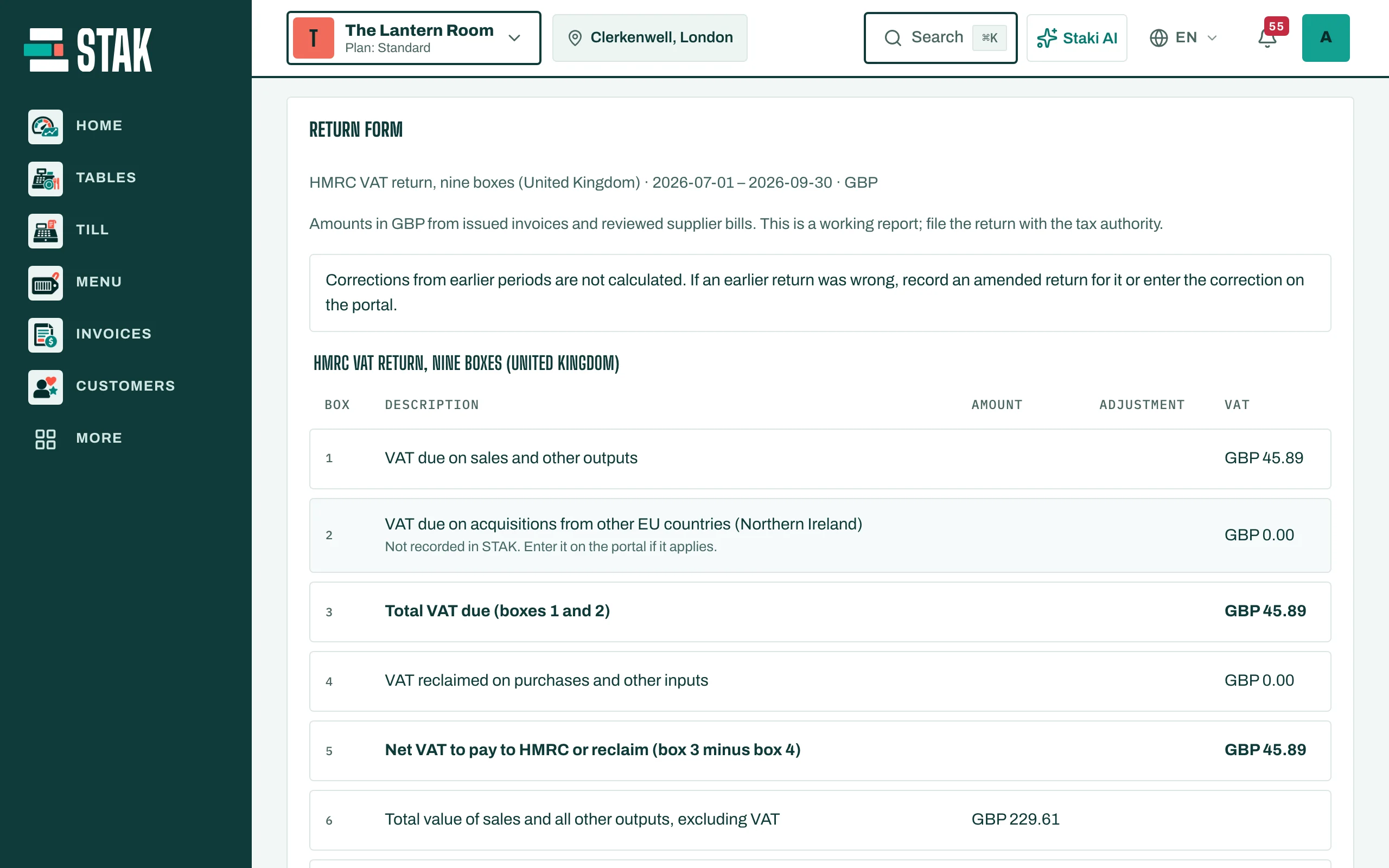
- Open the period. The Return form shows the figures in your country's layout, for example the ZATCA return in Saudi Arabia, the VAT201 in the UAE or the nine-box return in the United Kingdom, with Output VAT (sales) and Input VAT (purchases).
- Copy each figure into the authority's portal and file there.
Record that you filed
- Back in STAK, under Record the filed return, type the Filed on date and the Authority reference.
- Tick These figures match what I filed with the authority. and save.
The period shows Filed. If a document in that period changes later, STAK tells you and you can Record amended return.